
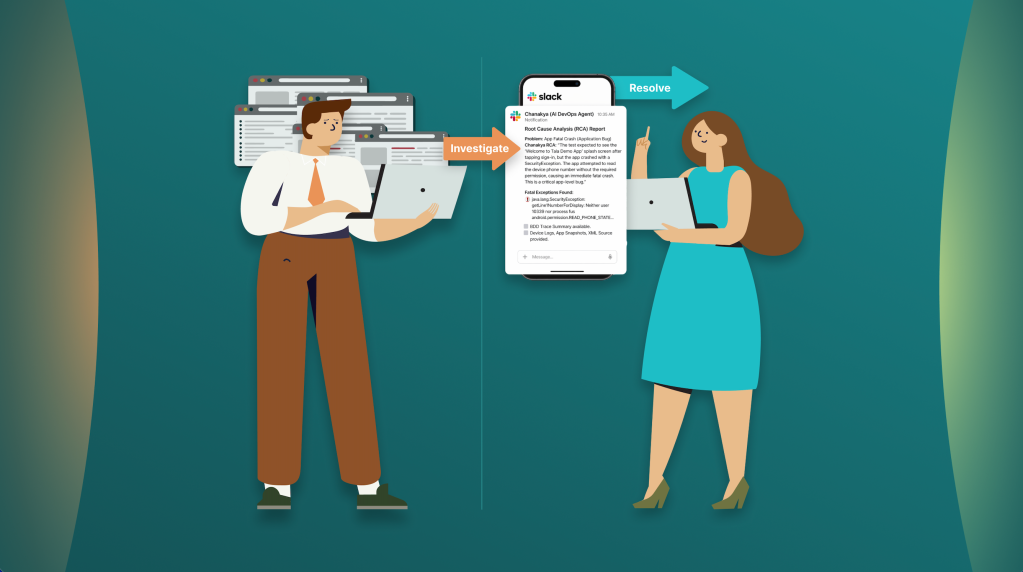
This article was originally published in Medium by Elliot Masor, Staff SDET Engineer at Tala.
1. Introduction: The Quality Bottleneck
At Tala, the combination of AI and Behavior-Driven Development (BDD) has fundamentally shifted our testing paradigm.
The struggle is familiar to any engineering team: broken builds in CI often turn into a tedious, time-consuming task. Sifting through unhelpful build logs and error messages causes delays and frustration. No one wants to see a test failure message like: “expected 1, but got 0”. What was expected to be 1? Why is it 0? Developers don’t want to spend their time investigating cryptic broken builds for their PRs, so they naturally default to asking SDETs the same question: “Why is my build failing?”
To break this cycle, we developed these core solutions that work in tandem:
- Acceptance Spec: We built an internal BDD framework on top of Kotest, a modern Kotlin test automation framework. This framework utilizes BDD as a readable structure for our tests, serving as a high-fidelity trace for every execution. Error messages don’t just show basic assertion errors; they show exactly what property is wrong, at what point in the BDD trace it happened, and provide a custom context of data for troubleshooting (e.g., traceId, userId, etc.).
- Chanakya: Our DevOps team built an infrastructure in AWS leveraging AgentCore and created Chanakya, our DevOps AI Agent. In close collaboration with DevOps, we provided Chanakya with knowledge to quickly troubleshoot test failures. Chanakya’s superpower is its ability to utilize the BDD traces as structured context feeding, allowing the agent to comprehend a failure the same way an engineer would—only much faster.
- Continuous Integration: When developers open pull requests (PRs), Acceptance Specs automatically kick off. Chanakya analyzes all failures and sends a Root Cause Analysis (RCA) report to Slack, alerting engineers with detailed information about what failed and why it failed. This flow significantly reduces mean time to resolution (MTTR) because the engineers can read Chanakya’s simplified report without having to analyze Jenkins Logs, Browser Stack logs, and Gradle Test Reports.
The New Reality: Before vs. After
By integrating these tools directly into our CI/CD pipeline, we’ve moved away from manual tedious troubleshooting toward proactive, AI-generated root cause analysis.
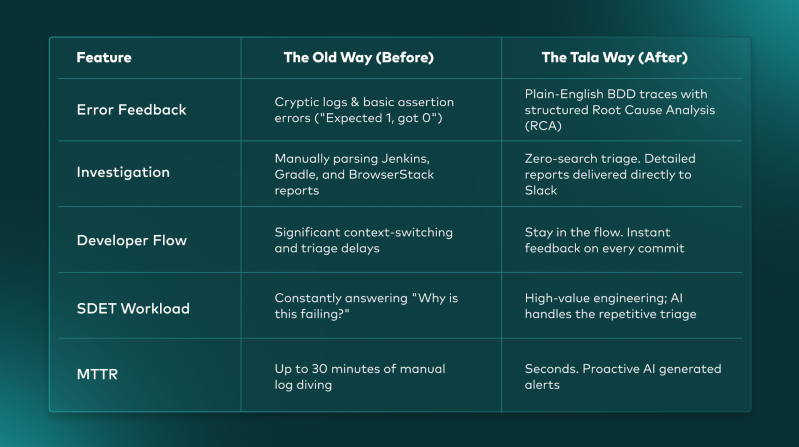
Figure 1: The Before and After, highlighting radically reduced MTTR
2. The Foundation: Acceptance Spec and the BDD Tree
Acceptance Spec was born out of our Frontend Automation initiative. Our Backend tests relied on Spock and Groovy, which utilized a comment-based BDD style. While this made tests readable, the given/when/then blocks were strictly descriptive—they weren’t bound to the underlying code, making them impossible to reuse or analyze programmatically.
Beyond reusability, we faced a major hurdle: Language Fragmentation. Our core libraries were written in Kotlin, but our tests were in Groovy. Coding in two languages for testing had several disadvantages:
- Confusion: It’s not clear when to use which language.
- Safety: Groovy was not truly type-safe, and interoperability between the two was not effective.
- AI Cognitive Friction: AI tools like Claude Code and GitHub Copilot had a difficulty understanding how Kotlin code should be called from Groovy.
2.1. Frontend Automation Test Layers and CI Strategy
For our Frontend Automation, we developed two testing layers integrated into a sophisticated Continuous Integration pipeline. A failed build automatically triggers Chanakya to perform a Root Cause Analysis (RCA), which is then posted directly to our Slack channels. This ensures engineers have immediate context and debugging data without needing to manually dive into build logs and troubleshoot Browser Stack sessions.
- Demo App (Layer 1 / PR Gate): All backend services are mocked using Fake Dependency Service, our in house mocking service, providing full control and stability. For details about this service, see How to Use Fake Dependency for Testing Microservices. Because these tests are fast and have zero backend dependencies, they serve as our primary PR Gate. For every Android App PR, we build a unique, PR-specific APK (e.g., PR-123.apk) and run Demo App Specs in parallel on BrowserStack App Automate. Failures here block the merge, ensuring no broken code reaches the qa branch.
- E2E (Layer 2 / Integration Monitor): The Frontend is integrated with real backend services. These tests are necessary to catch real integration issues but are more time-consuming. In our CI, E2E specs run on the qa.apk after a merge. Failures here do not block any PRs, allowing us to monitor stability without blocking the developer workflow.
- Release Gate (Both Layers): When a release branch is cut, we build a release.apk and run both Demo App and E2E specs. At this stage, any failure BLOCKS the release, ensuring that only fully validated builds are released to our users.
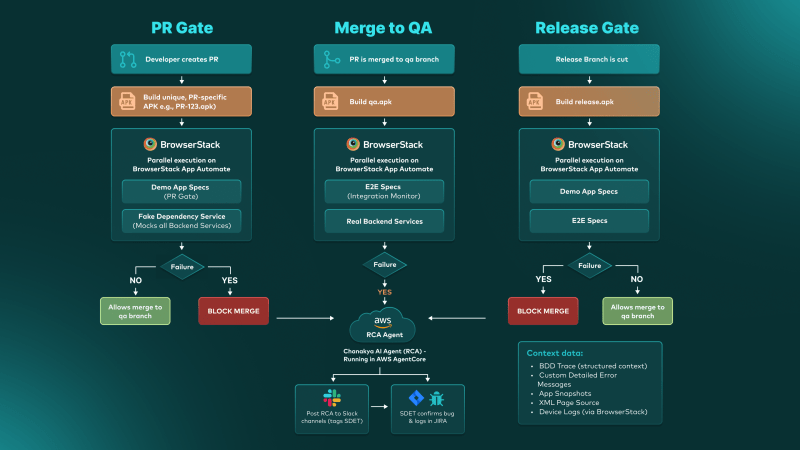
Figure 2: The Tala Frontend Automation CI Lifecycle, highlighting the gating mechanisms for PRs, Merges, and Releases.
2.2. Browser Stack Integration
BrowserStack is our core test infrastructure for Frontend Automation. Our BDD traces are pushed to BrowserStack as the tests run. When a failure occurs, Chanakya will have the following data to troubleshoot with:
- Custom Detailed Error Messages: Context-aware failures rather than generic assertion errors.
- BDD Trace: The entire test flow in English.
- App Snapshots: A visual image of the app at the point of failure.
- XML Page Source: The full UI hierarchy of the app at the point of failure.
- Device Logs: Browser Stack provided Android device logs.
All of this data provides the investigative context required for both human engineers and Chanakya.
3. The Anatomy of a Trace: Layers of Logic
To build a truly traceable BDD tree for Chanakya to analyze, we use a layered architecture that binds English directly to executable logic.
3.1. Layer 1: The Specification Layer
This is where engineers define the business behavior. Unlike Cucumber which uses separate Gherkin files, our BDD is 100% Kotlin.
The mocks in our Demo App give us simple, granular control over the user state. For example, we can easily force a “Rejected” journey just by mocking the response, allowing us to immediately validate that the rejected page is shown with the correct content. An E2E test is less efficient, because rejecting or accepting a loan application is a complex, time-consuming process involving multiple downstream services. Mocking the backend services enables us to run more tests in less time compared to E2E.
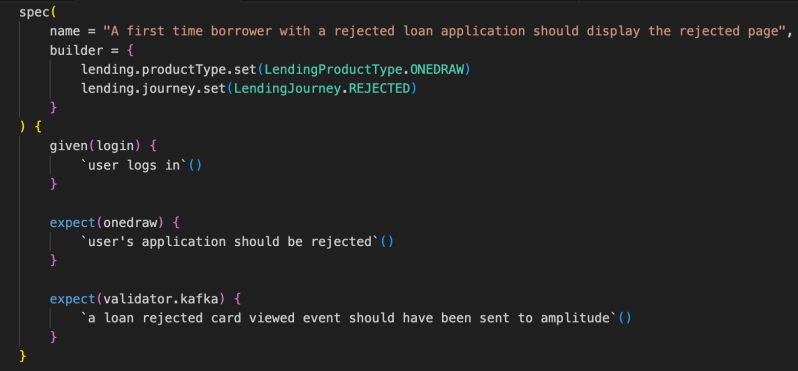
Figure 3: Specification Layer
3.2. Layer 2: The Step Definitions
Below the spec layer, we use our reflection-based naming resolver to define three distinct types of BDD steps:
- Step Leaves (defineStep): Atomic actions—the “leaves” (e.g., send keys, click button).
- Step Containers (defineContainer): Groups of reusable actions (e.g., a login sequence).
- Assertion Containers (defineAssertions): Specialized containers for validation that support Fail-Slow logic.
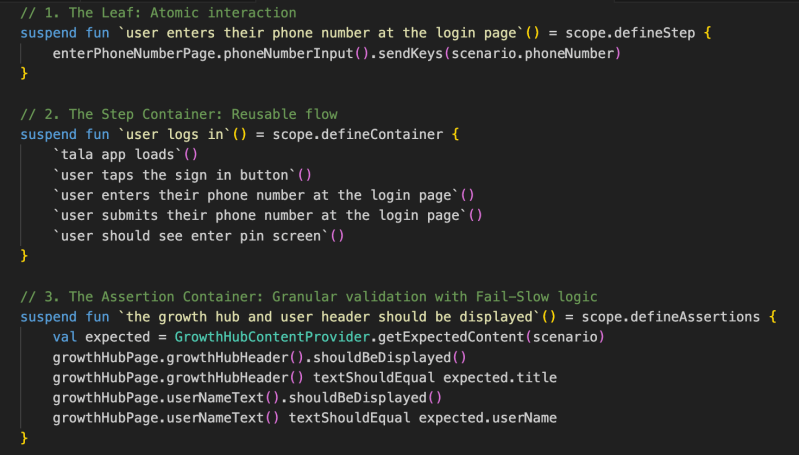
Figure 4: BDD Step Definition Layer
3.3. The Result: Chanakya’s Debugging Context
When a test fails, Acceptance Spec generates a BDD Trace that provides comprehensive debugging context for Chanakya. This isn’t just a basic error log; it is a structured, chronological timeline of the entire execution path leading up to the failure. Because of our Fail-Slow assertion logic, Chanakya is able to analyze multiple failures within the same assertions container. Below are two example RCA reports.
Example 1: Test Validation Issue
In this scenario, a developer purposely asserted incorrect values to verify the trace. Chanakya successfully identified that the application was correct and the test script was at fault.
BDD Trace Excerpt (RAW): This is the actual raw BDD trace sent to Browser Stack for Chanakya to digest.
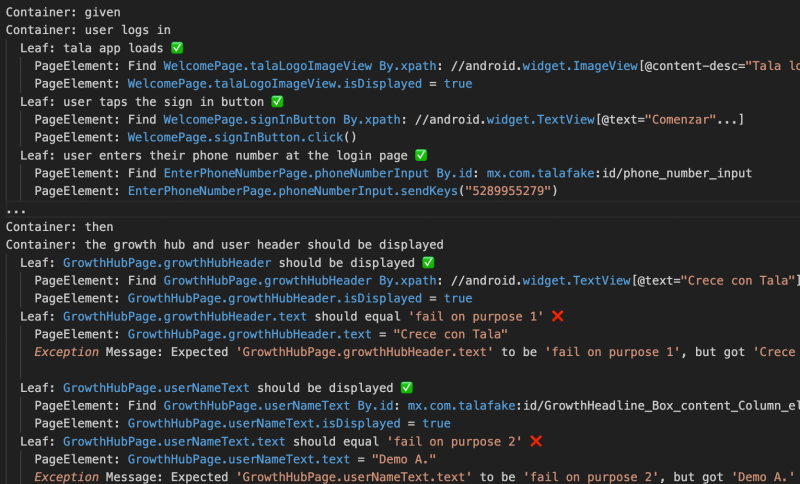
Figure 5: BDD Trace
Chanakya RCA:
“This test was intentionally designed to fail. The test assertions expected the Growth Hub* header to say ‘fail on purpose 1’ and the user name to say ‘fail on purpose 2’, but the app correctly displayed ‘Crece con Tala’ and ‘Demo A.’ respectively. This is a test validation issue, not an application bug. The app navigated successfully through login, OTP verification, and displayed the Growth Hub screen with all correct data.”
*Growth Hub is a section of the Tala app that allows customers to clearly visualize how their credit journey with Tala progresses.
Example 2: Application Bug (Fatal Crash)
In this case, Chanakya correlated a UI failure with a fatal system-level exception found in the device logs.
BDD Trace Excerpt (AI Summary): This is Chanakya’s summary of the BDD Trace.

Figure 6: BDD Trace AI Summary
Device Logs Errors Found:
Fatal Exceptions: FOUND – java.lang.SecurityException: getLine1NumberForDisplay: Neither user 10339 nor current process has android.permission.READ_PHONE_STATE, android.permission.READ_SMS, or android.permission.READ_PHONE_NUMBERS
Chanakya RCA:
“The test expected to see the ‘Welcome to Tala Demo App!’ splash screen after tapping sign-in, but the app crashed with a SecurityException. The app attempted to read the device’s phone number without the required READ_PHONE_STATE permission, causing an immediate fatal crash. This is a critical app-level bug in the PH fake/demo build.”
Once the investigation is complete, Chanakya posts these findings directly to Slack, tagging the responsible SDET. The SDET can then confirm the bug and log it in JIRA with all context—logs, traces, and screenshots—already provided by the AI within the Slack investigation.
4. The Impact: A New Paradigm for Engineering
Acceptance Spec and Chanakya have redefined quality engineering at Tala.
- Radical MTTR Reduction: Troubleshooting has moved from the desk to the pocket. Engineers can now diagnose test failures directly from their phones via Slack.
- Drastic Regression Efficiency: We’ve slashed our manual testing requirements by 66%. Previously, every two-week sprint and release cycle demanded three full days of manual regression. Despite a growing volume of test cases driven by our rapid global expansion, our automation framework has compressed that timeline to just one day for all countries.
- AI-Guided Architecture: Using Claude Code with our custom Markdown Guides, AI now generates new tests that follow our internal design patterns accurately. However, we have checks in place so that AI cannot just open and merge PRs. PRs can be opened by Claude, GitHub Copilot, and engineers. To ensure quality, PR gates restrict merging by Continuous Integration, GitHub Copilot Reviews, and engineer reviews.
- Accelerated Backend Migration: Migrating a massive suite of legacy Spock/Groovy tests is usually a multi-year manual effort. We leveraged Claude Code to automate the migration of our newer Backend automation suites to the Acceptance Spec framework. By standardizing on a 100% Kotlin stack, we have unified our ecosystem with simplified code, making it easier for engineers and AI Tools to contribute. Our SDETs maintain AI Guides on how to write tests per microservice as well as common standards, propelling migration to Acceptance Spec and writing new tests.
5. Conclusion: The Future is AI-Native
At Tala, AI has integrated deeply into our engineering lifecycle. From Claude Code to Chanakya, we are building and testing at lightning pace. Chanakya will continue to evolve as we teach it new skills. Here’s what’s next for Chanakya:
- Logging Bugs in JIRA by engineers responding to RCA in Slack.
- Diving deeper into our source code to find and fix bugs. This will be accomplished with AI Guided architecture. Our encyclopedia of knowledge in MD format provides AI with capabilities on test automation and software development for frontend and backend.
Chanakya is just getting started.